
Want to get the FBR IRIS Login in Pakistan? Access the official FBR IRIS 2.0 Portal. All registered taxpayers log in using their Registration No. and Password. Persons use their CNIC and AOPs and companies use their National Tax Number (NTN) as their registration number.
For newly registered individuals as an individual taxpayer, register by selecting New Registration. Use Forgot Password / Account Recovery if you already have an account, but forgot the password, instead of using a new account.
FBR IRIS Login — Quick Answer
To access your FBR taxpayer account:
- Open the official IRIS portal: https://iris.fbr.gov.pk/.
- Enter your Registration No.
- Enter your IRIS password.
- Select Login.
- Complete any additional verification displayed by the portal.
- Once authenticated, continue to your IRIS dashboard and the service you need.
The user login screen of FBR’s IRIS 2.0 manual also displays a Registration No., a password, and includes e-Enrollment and New Registration links.
If you have lost your password, click on Forgot Password, rather than continually trying to guess it.
What Is the Official FBR IRIS Portal in Pakistan?
The Federal Board of Revenue (FBR) has established an online system for income-tax called FBR IRIS. Taxpayer registration and online filing of income-tax returns in FBR are made possible through IRIS, while IRIS 2.0 makes verification and payment services and others available to taxpayers.
The official FBR IRIS portal in Pakistan is:
https://iris.fbr.gov.pk/
This IRIS domain is also linked to FBR’s own online-verification system, which will guide taxpayers to avail the IRIS’ income-tax services.
How to verify you are using the official portal
Before entering your CNIC, NTN or password:
- Check that the domain belongs to FBR.
- Prefer a saved bookmark or navigate from the FBR website.
- Avoid entering credentials on websites reached through unsolicited messages.
- Do not provide your IRIS password or account-recovery codes to someone merely because they claim to represent FBR.
The aim is very clear that your IRIS account carries highly confidential tax and ID information and hence the login information such details should be only entered in the official FBR services.
Is e-FBR the same as IRIS?
The searcher who has searched your query “e FBR IRIS login” is presumably looking for the current online tax system of FBR.
Users of old e-FBR services/old e-FBR pages may still get the old pages in search but FBR now encourages the users of income-tax online verification and filing to the IRIS.
The official IRIS portal is the first place to begin to access the normal income-tax accounts for 2026.
What You Need for FBR IRIS Login
You generally need:
- your FBR Registration No.; and
- your IRIS password.
FBR says e-enrollment will give taxpayers an NTN/Registration Number and password to access to IRIS.
Registration number for individuals
In the case of an individual taxpayer, FBR will take the NTN as 13 digit CNIC/Registration Number.
Normally, you do not have to keep in mind a separate seven-digit NTN to recognize your individual IRIS account.
Registration Number for AOPs and Companies
An Association of Persons or a company will use their 7-digit NTN given after e-enrollment as their Registration Number.
If you are handling more than one taxpayer entity, be sure to enter the credentials of the taxpayer, AOP or company you are working with.
How to Login to FBR IRIS 2.0 (Step by Step)
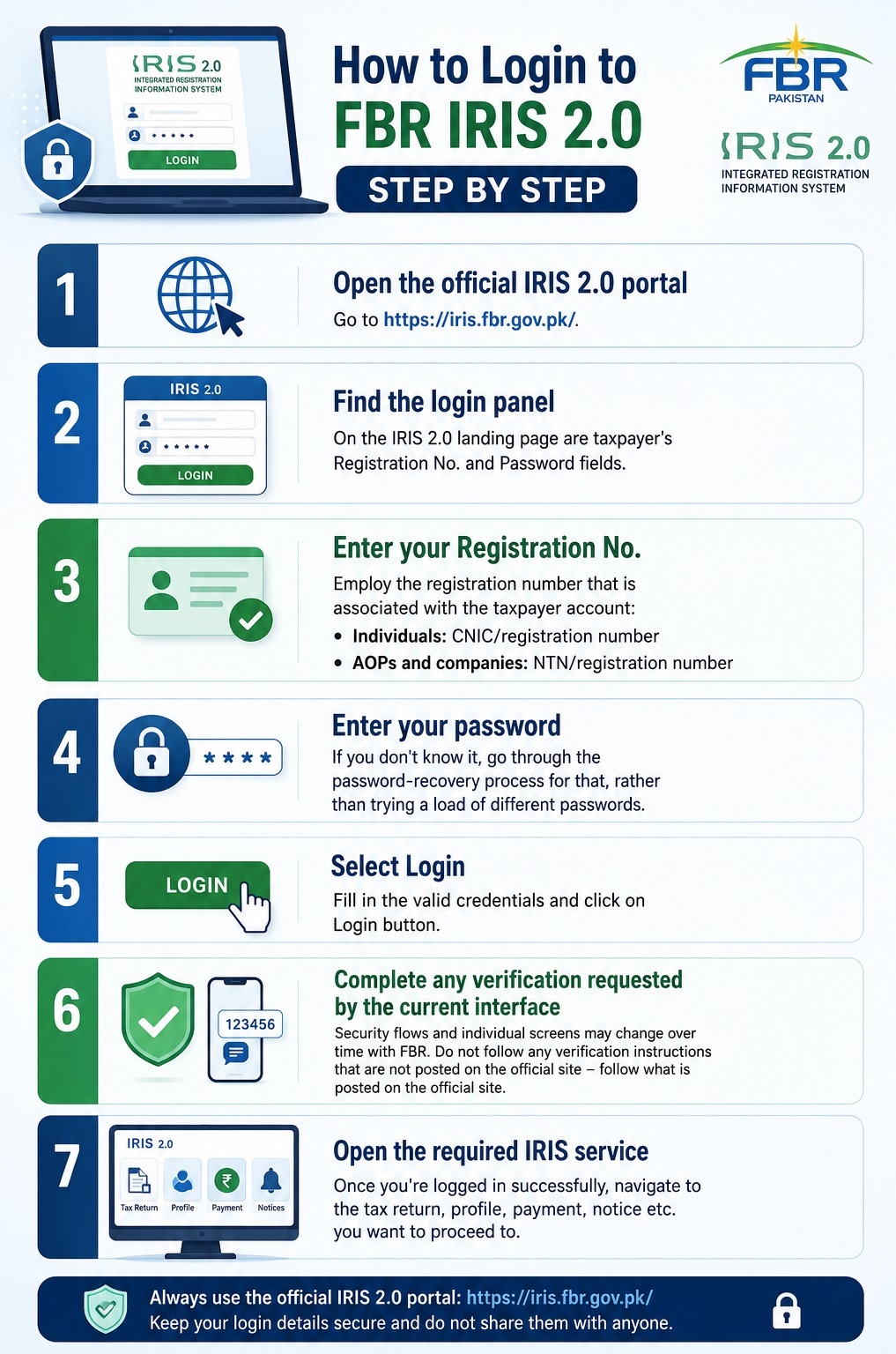
1: Open the official IRIS 2.0 portal
Go to https://iris.fbr.gov.pk/.
2: Find the login panel
On the IRIS 2.0 landing page are taxpayer’s Registration No. and Password fields.
3: Enter your Registration No.
Employ the registration number that is associated with the taxpayer account:
- Individuals: CNIC/registration number
- AOPs and companies: NTN/registration number
4: Enter your password
If you don’t know it, go through the password-recovery process for that, rather than trying a load of different passwords.
5: Select Login
Fill in the valid credentials and click on Login button.
6: Complete any verification requested by the current interface
Security flows and individual screens may change over time with FBR. Do not follow any verification instructions that are not posted on the official site – follow what is posted on the official site.
7: Open the required IRIS service
Once you’re logged in successfully, navigate to the tax return, profile, payment, notice etc. you want to proceed to.
FBR IRIS 2.0 Login — What Has Changed?
IRIS 2.0 is FBR’s current branded portal experience. FBR provides official documentation of its help resources, manuals for landing-pages and dashboards of IRIS 2.0.
What is crucial for the tax-payer is that the concept of login is still very simple: registered tax-payers enter a valid Registration No. and password.
New Registration, e-Enrollment and recovery options
The IRIS landing page provides options such as:
- Login
- Forgot Password / Account Recovery
- New Registration
- e-Enrollment
You will need to choose the precise one according to your circumstances.
Please make sure you select New Registration only if you’re forgetting a password. The old taxpayer should be able to get access to his old record.
Services available from IRIS 2.0
The IRIS 2.0 landing environment includes access to services such as:
- online taxpayer verification,
- Active Taxpayer List verification,
- e-payments,
- Tax Asaan,
- FBR Maloomat,
- taxpayer help resources.
That’s why users looking for access to the official site of FBR, “FBR IRIS 2.0 login” and “FBR IRIS portal login” are basically in search of the same official taxpayer portal.
FBR IRIS Registration vs Login
Registration and login are not the same thing.
| FBR IRIS registration | FBR IRIS login |
| Creates/establishes your taxpayer registration | Opens an existing taxpayer account |
| Needed when you are genuinely unregistered | Used by an already registered taxpayer |
| Requires identity/contact/taxpayer information | Requires existing login credentials |
| Results in a Registration No./NTN and account access | Gives access to your IRIS services |
| Usually done once | Used whenever you need the portal |
FBR defines e-enrollment as: the process in which the taxpayer will be given an NTN or a Registration Number and a password.
In case you already have an NTN or Registration Number without having login details, do not go on the FBR’s account-access/e-enrollment path, but instead follow the path of NTN or Registration Number. An e-enrollment route is also available for registered persons that do not have IRIS credentials but have a registration number, according to FBR.
How to Register for FBR IRIS
Online registration for individuals
The current FBR guidance states that online registration is possible for people. The taxpayer should be provided with his/her mobile number, his/her own email and supporting information/documents before he/she begins to complete the process.
FBR separately lists information such as:
- CNIC/NICOP/passport information
- mobile number
- active email
- nationality
- residential address
- business information where applicable
- employer NTN for salary income where applicable
- property information where applicable
Fill in the official IRIS registration form and apply using New Registration. The IRIS 2.0 New Registration screen will start with asking whether the taxpayer is a new one or not, followed by formulating personal details like CNIC, Taxpayer’s full name and so on.
Registration for AOPs and companies
Don’t make the mistake of thinking that the same online-registration process applies, without any changes, to each entity.
FBR has published its guidance on the registration process which states that the process is available online for individuals and companies, while registration at Tax House facilitation counters is available for individuals, AOP and companies.
For AOPs and companies, there are more documents to be submitted such as information about entities and authorized persons.
Information and documents to prepare
There are different requirements based on the type of taxpayer and income source. For individuals, FBR’s current guidance includes personal/contact details and for companies and AOPs, there is more extensive information on organizational, director/partner and incorporation details.
Make sure to have the appropriate information ready before you get started, avoiding the use of temporary or incorrect contact details that could make it difficult to retrieve your account later.
How to Reset a Forgotten FBR IRIS Password
On the official IRIS login screen click Forgot Password if you have forgotten it.
According to FBR’s published “password” guidance, the user needs to provide the necessary information, gets codes via the registered email and mobile number, inputs the codes, and then has the option to reset the password.
Forgot Password when you still have registered email/mobile access
The normal process is:
- Open the official IRIS login page.
- Select Forgot Password.
- Enter the required account information.
- Receive the verification codes through your registered contact channels.
- Enter the codes.
- Set the new password.
- Return to the login screen.
To avoid creating a new taxpayer registration in case of a forgotten password, please consult the person who registered you or your bank. If you forgot your password, please refer to the person who registered you or your bank.
Account Recovery when contact information is no longer accessible
IRIS 2.0 also has a dedicated account recovery path for the taxpayers who are no longer able to access their registered mobile number or e-mail address.
Do not give your credentials to an unknown third party if they cannot be retrieved online – use an official FBR support or the RTO process as appropriate.
How to Change Your Mobile Number or Other IRIS Details
There are a number of things you can change the details of as soon as you log in to FBR.
Details that can be updated through Form 181
The Registration Form 181 for modification can be used using IRIS to update the following information: FBR
- mobile number,
- residential address,
- business address,
- business branches,
- legal representative information,
- bank account information.
If a taxpayer still has access to the account, then he/she should ensure that the registered mobile number and other crucial information is kept up-to-date before needing to recover the password.
Changes that require an RTO
Some changes will involve a visit to the relevant Regional Tax Office such as changes relating to:
- CNIC number,
- email,
- deregistration,
- jurisdiction,
- discontinuance of business,
- Pakistan Origin Card information.
For each change, follow the instructions provided by the FBR. Note that the procedure for recovering an account and/or registering a new one may vary depending on what information is the subject of the change.
FBR IRIS Login Not Working? Common Problems and Fixes
If you are having issues with your FBR IRIS login, figure out the issue so you don’t have to try to log in repeatedly.
| Problem | What to do |
| Registration No. entered incorrectly | Recheck the taxpayer identifier linked with the account |
| Incorrect password | Retype carefully or use Forgot Password |
| Forgotten password | Start the official password-reset process |
| No access to registered mobile/email | Use Account Recovery or contact FBR |
| New taxpayer | Use New Registration rather than Login |
| Already registered but missing credentials | Use the appropriate e-enrollment/account-access route |
| Portal displaying maintenance/unavailable message | Wait and retry through the official domain |
| Browser/session issue | Refresh the session, reopen the browser or clear stale site data |
| Contact details need changing | Use Form 181 or the RTO route appropriate to the field |
Incorrect registration number or password
To ensure you are logging in to the right taxpayer account and the correct Registration No. ensure the following:
A person’s CNIC is his/her registration number and an AOP/company has its seven digit NTN as its registration number.
If it is the registration number that is correct and the password is wrong, proceed to Forgot Password.
Forgotten password
Take advantage of the official recovery method instead of trying to recover over and over again. FBR offers a specific reset procedure, connected with the taxpayer’s enrolled email address and mobile information.
Verification or recovery problems
If the password-reset fails due to failure to contact your contacts, or your contact information has changed, you can try the Account Recovery route, or contact FBR.
Portal loading or maintenance problems
IRIS might occasionally show up maintenance or temporary service messages from FBR. If the official domain does not exist, don’t use an unofficial looking domain that comes up in search results just because it is not the official domain.
Try the official FBR service at a later time or contact FBR’s support.
Browser or session problems
For a page that partially loads or behaves unexpectedly:
- reload the official page;
- close stale IRIS tabs;
- reopen the browser;
- clear site cache/cookies if necessary;
- test another current browser or device;
- confirm your internet connection.
Do not interpret every loading problem as an invalid taxpayer account.
What Can You Do After FBR IRIS Login?
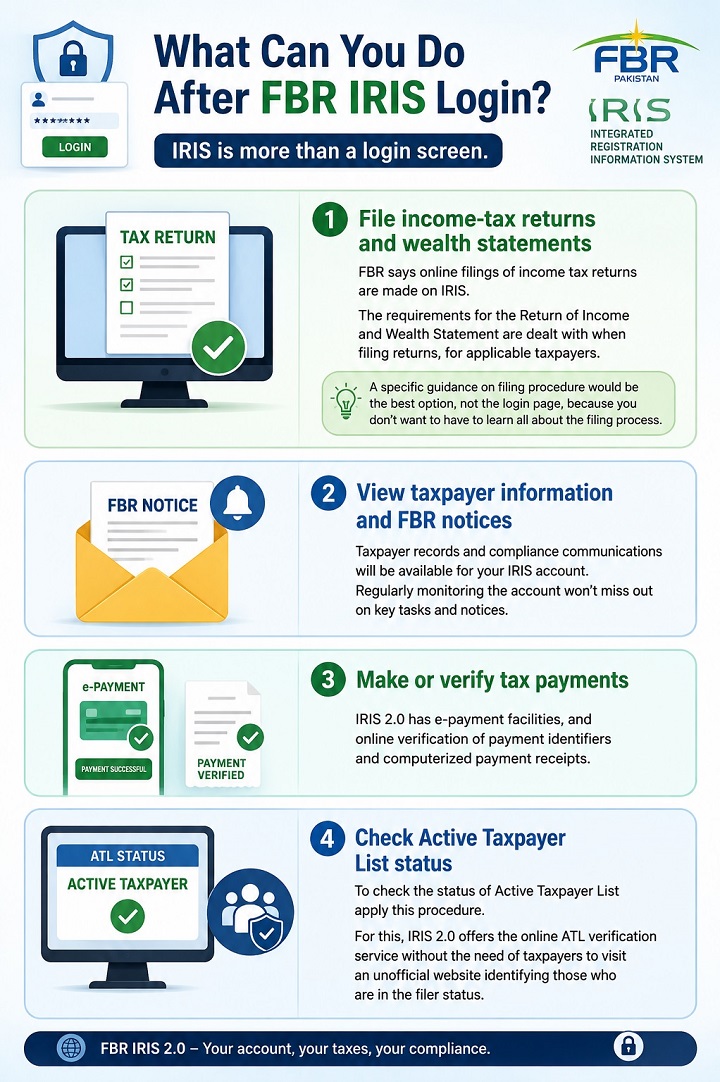
File income-tax returns and wealth statements
FBR says online filings of income tax returns are made on IRIS. The requirements for the Return of Income and Wealth Statement are dealt with when filing returns, for applicable taxpayers.
A specific guidance on filing procedure would be the best option, not the login page, because you don’t want to have to learn all about the filing process.
View taxpayer information and FBR notices
Taxpayer records and compliance communications will be available for your IRIS account. Regularly monitoring the account won’t miss out on key tasks and notices.
Make or verify tax payments
IRIS 2.0 has e-payment facilities, and online verification of payment identifiers and computerized payment receipts.
Check Active Taxpayer List status
To check the status of Active Taxpayer List (ATL) apply this procedure.
For this, IRIS 2.0 offers the online ATL verification service without the need of taxpayers to visit an unofficial website identifying those who are in the filer status.
How to Check Filer/ATL Status
The Active Taxpayer List (ATL) is FBR’s list that is kept for active taxpayer verification.
As of now FBR has three ways to verify the income-tax ATL status:
- online verification,
- SMS,
- downloading the ATL.
Online verification
Use FBR’s official ATL/online-verification service and fill in the information FBR is asking for taxpayers.
ATL status by SMS
FBR’s published SMS method is:
- Individual: ATL + space + 13-digit CNIC → send to 9966
- AOP/company: ATL + space + 7-digit NTN → send to 9966
The format of the AOP/company is as follows: ATL + space + 7-digit NTN → send to 9966
This is much better than inputting your CNIC number on an unknown website that is not from a party on which you trust.
FBR IRIS Login Security Tips
Use these basic precautions:
- Sign in only through an official FBR domain.
- Keep your IRIS password private.
- Do not share password-reset or verification codes.
- Keep your registered mobile number and email information up to date.
- Avoid saving credentials on shared or public computers.
- Log out when using a device other people can access.
- Treat unsolicited “FBR login” links sent through messaging apps or social media cautiously.
- Use the official Account Recovery process when access is lost.
A safe recovery approach is better than establishing duplicate sign-ups or entrusting precious taxpayer data to unknown people.
FBR Help and Account Support
If self-service recovery does not resolve the problem, FBR currently lists the following support channels:
- National helpline: 051 111 772 772
- International: +92 51 111 772 772
- Email: helpline@fbr.gov.pk
FBR’s current helpline is open from 8:00 a.m. to 11:30 p.m. from Monday till Friday.
If a change in registration is required by FBR, please contact or visit the appropriate Regional Tax Office with the appropriate supporting documents.
Frequently Asked Questions (FAQs)
What is the official FBR IRIS login website?
FBR has launched an official IRIS 2.0 portal: https://iris.fbr.gov.pk/. FBR’s online services and help materials will provide taxpayers with a link to the IRIS domain.
Can I login to FBR IRIS with my CNIC?
FBR considers 13 digit CNIC as NTN/Registration Number for an individual. You will then use that IRIS password.
What is my IRIS username or registration number?
The Registration Number of a person taxpayer is the CNIC. It is the seven-digit NTN number that is issued following e-enrollment for an AOP/Company.
What is FBR IRIS 2.0?
The current FBR branded taxpayer login portal and other online tax services experience is IRIS 2.0. Official manuals for landing page and dashboard of IRIS 2.0 are published by FBR.
How do I reset my FBR IRIS password?
When logging on to IRIS, click Forgot Password, and complete FBR’s verification process. Before resetting a password, codes are sent to the registered e-mail address and mobile number, FBR says.
What if I no longer have my registered mobile number?
Take advantage of the IRIS account-recovery process, if available. If there is a need for formal change in the taxpayer details then it is advisable to proceed as per the FBR Form 181 and/or RTO procedure, depending on the information to be changed.
Why is my FBR IRIS login not working?
Typical scenarios might be: incorrect credentials, forgotten password, out of date contact information, account-recovery problems, browser/session issues or temporary portal issues. Instead of registering, log into and recover from the official logins.
How do I register for FBR IRIS?
FBR’s online-registration facility can be utilised by individuals. However, FBR’s published guidance mentions that online registration is only for individuals whereas Tax House facilitation-counter registration is open to individuals, AOPs and companies.
Is e-FBR IRIS login different from IRIS 2.0?
The old e-FBR pages may still be available on the Internet, but FBR now provides a link to IRIS for its income-tax customers. To login and avail online income tax services for normal taxpayers, they should begin with https://iris.fbr.gov.pk/.
Is there an official FBR mobile option?
FBR also offers IRIS via its web environment, and promotes Tax Asaan as a mobile service. Tax Asaan is a one-stop mobile application for services such as Income Tax Registration, Return Filing, Payment and Verification as mentioned in the IRIS 2.0 landing page.
Final Summary
To FBR IRIS Login in Pakistan 2026, visit the FBR IRIS official portal www.iris.fbr.gov.pk/IRIS.The first step to login FBR IRIS in Pakistan 2026 is to visit the FBR IRIS official portal (www.iris.fbr.gov.pk/IRIS). If you are unable to log in to the portal, please try to use the official Forgot Password or Account Recovery features of the portal.